Trend Confirmation Lines
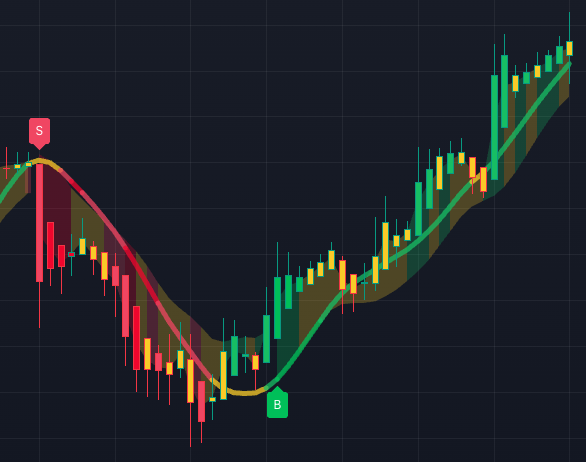
The Confirm Line is the backbone of the Algo chart.
Buy and Sell labels show that the trend engine has detected a directional flip, but the Confirm Line helps you judge whether price structure is actually supporting that idea.
In the script, the Confirm Line is powered by a separate swing score.
That score blends a different, slower moving set of multiple well known and proprietary indicators than trend score used for the buy sell indicators.
The line is then colored by strength:
- Green for bullish
- Red for bearish
- Yellow when the chart is choppy, slowing, or less decisive
That is why the Confirm Line matters.
It is not just another moving average on the chart. It is a secondary confirmation layer built to help you filter signals and avoid treating every label as equal.
What the Confirm Line tells you
Use the line to answer three practical questions:
- Is the signal working with the chart structure or fighting it?
- Is price respecting the line cleanly, or chopping around it?
- Is the line showing strength, weakness, or caution?
A Buy label above a supportive green Confirm Line is a cleaner read than a Buy label pushing directly into a red or yellow line.
A Sell label below a supportive red Confirm Line is cleaner than a Sell label that appears while price is still fighting bullish structure.
How to use it in the workflow
After every Buy or Sell label, make the Confirm Line your first filter:
- Signal appears.
- Confirm Line agrees, conflicts, or warns you to slow down.
- Higher Timeframe Panel checks whether the broader view supports the same side.
- Squeeze + Momentum checks pressure, release, divergence, and energy.
- Support/resistance and SL/TP levels decide whether the setup has clean structure.
This prevents the signal from becoming a standalone opinion.
The label gets your attention; the Confirm Line tells you whether the chart has enough structure to keep reviewing.
Why InsiderFinance makes confirmation easier
Manual confirmation is where traders often get inconsistent:
- One day they use a moving average.
- The next day they use a candle pattern.
- The next day they ignore trend structure entirely because the signal looks exciting.
InsiderFinance keeps the Confirm Line attached to the same chart as the signal, levels, higher-timeframe panel, alerts, and lower-pane oscillator.
That makes confirmation a required part of the workflow instead of something you remember only after the trade gets messy.
Your next step
Find one recent signal where the label and Confirm Line agree, then find one where they conflict.
The difference is the point of this lesson.