Automated Higher Time Frame Table
A strong signal on your active chart becomes much more useful when the higher timeframes agree.
The Higher Timeframe Panel is built to make that check fast.
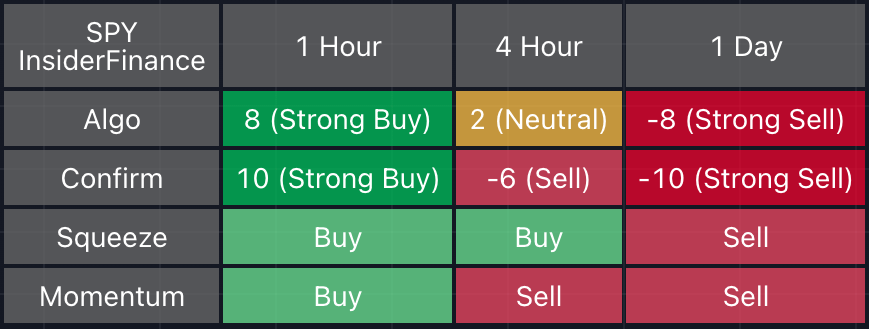
Instead of opening several charts and rebuilding the same read manually, the panel displays the current timeframe plus selected higher timeframes in one table.
For each timeframe, it summarizes the same core technical layers:
- Algo
- Confirm
- Squeeze
- Momentum
What the panel shows
The panel is not a generic dashboard. It is tied directly to the indicator logic:
- Algo: the trend score from the Algo engine, scaled into an easy-to-read rating.
- Confirm: the swing/Confirm Line score, showing whether structure supports the trend.
- Squeeze: the lower-pane squeeze read, showing compression/release and pressure context.
- Momentum: the lower-pane momentum read, showing whether energy supports or conflicts with the move.
The cells are color coded so you can quickly see agreement:
- More green means stronger bullish alignment.
- More red means stronger bearish alignment.
- Neutral or mixed reads tell you the setup may need more patience.
Why higher timeframe context matters
Many bad trades start with a signal that looks clean on one timeframe and weak on the broader chart:
- A 5-minute Buy label can appear while the 1-hour or 4-hour read is still heavy.
- Momentum can look exciting on the active chart while the higher timeframe remains neutral.
- Price can push through a local level while the bigger trend has not turned.
The panel helps you catch that conflict before you over-focus on the active chart.
How to use the panel
Before giving a signal serious attention, classify the panel:
- Aligned: active chart and higher timeframes mostly agree.
- Mixed: the active chart is early, and higher timeframes need more confirmation.
- Conflicted: the active signal is fighting the broader read.
Aligned setups deserve deeper review.
Mixed setups belong on watch.
Conflicted setups should make you slow down unless another part of your process gives you a very clear reason to keep watching.
Why InsiderFinance makes this easier
Higher-timeframe analysis is one of the most valuable parts of technical analysis and one of the easiest to skip.
InsiderFinance keeps it on the chart, with controls for how many higher timeframes to show and where the panel sits.
That makes the bigger picture part of every signal review instead of a separate task.
Your next step
Open the panel and review one active chart.
Do not just ask whether the current candle looks good. Ask whether the current timeframe, one higher timeframe, and two higher timeframes are telling the same story.