Sniper Crosses
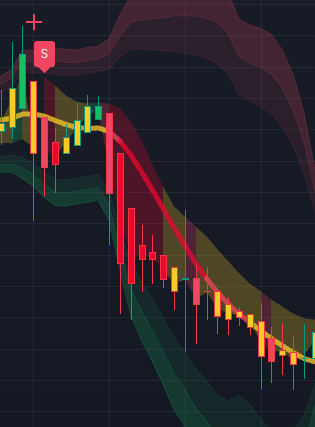
Sniper Crosses are the selective "rubber-band snap" markers inside the InsiderFinance Algo.
They are designed for moments when price stretches too far, reaches an important location, momentum starts to shift, and the chart snaps back sharply enough to deserve a closer review.
This is different from a normal Buy/Sell label. A Buy or Sell label tells you the trend engine flipped.
A Sniper Cross is more location-sensitive. It is asking: did price stretch into a key support/resistance or Bollinger-style volatility area, then react back with enough trend and swing improvement to matter?
What creates a Sniper Cross
The script is looking for four ingredients:
- Stretch: the prior trend score was overextended or exhausted.
- Location: price is near support, resistance, or an outer Bollinger Band area.
- Snap: the swing score changes sharply, showing a fast reaction away from the stretched area.
- Trend bend: the trend score starts improving for a Sniper Long or weakening for a Sniper Short.
The script also uses a cooldown so crosses do not fire repeatedly on every noisy bar. That makes the cross a selective attention cue, not a constant signal stream.
How to read Sniper Long and Sniper Short
- A Sniper Long appears as a + cross when the chart has stretched down near support or a lower volatility band and then starts to snap back.
- A Sniper Short appears as a + cross when the chart has stretched up near resistance or an upper volatility band and then starts to reject back.
When one appears, do not treat it as an automatic trade. Treat it as a high-focus review moment:
- Confirm the cross direction.
- Check the Confirm Line and recent Buy/Sell behavior.
- Inspect the nearby support/resistance or Bollinger Band area that gave the cross its location context.
- Use Squeeze + Momentum to see whether compression, release, divergence, consensus, or high volume supports the snap.
- Check the Higher Timeframe Panel so you are not fighting the broader trend.
- Use SL/TP levels to decide whether the setup has clean enough structure.
Why InsiderFinance makes Sniper Crosses practical
Most traders can see a stretched chart after the fact.
The hard part is catching the moment when stretch, location, momentum shift, and reaction start to line up in real time.
InsiderFinance puts that logic directly into the Algo, lets you show or hide Sniper Crosses from the settings, and exposes Sniper Long/Short alert conditions so the setup can come back to you instead of requiring constant screen watching.
The advantage is precision.
Sniper Crosses help you focus on extreme-location snapback setups, then the rest of the InsiderFinance workflow helps you decide whether the moment is actually worth attention.
Your next step
Turn on Sniper Crosses in the Algo settings and study three recent examples.
For each one, identify the stretched level, the snapback direction, the Confirm Line context, the lower-pane read, and the risk structure.